Travel Router: Is It Worth Packing for Wi-Fi?
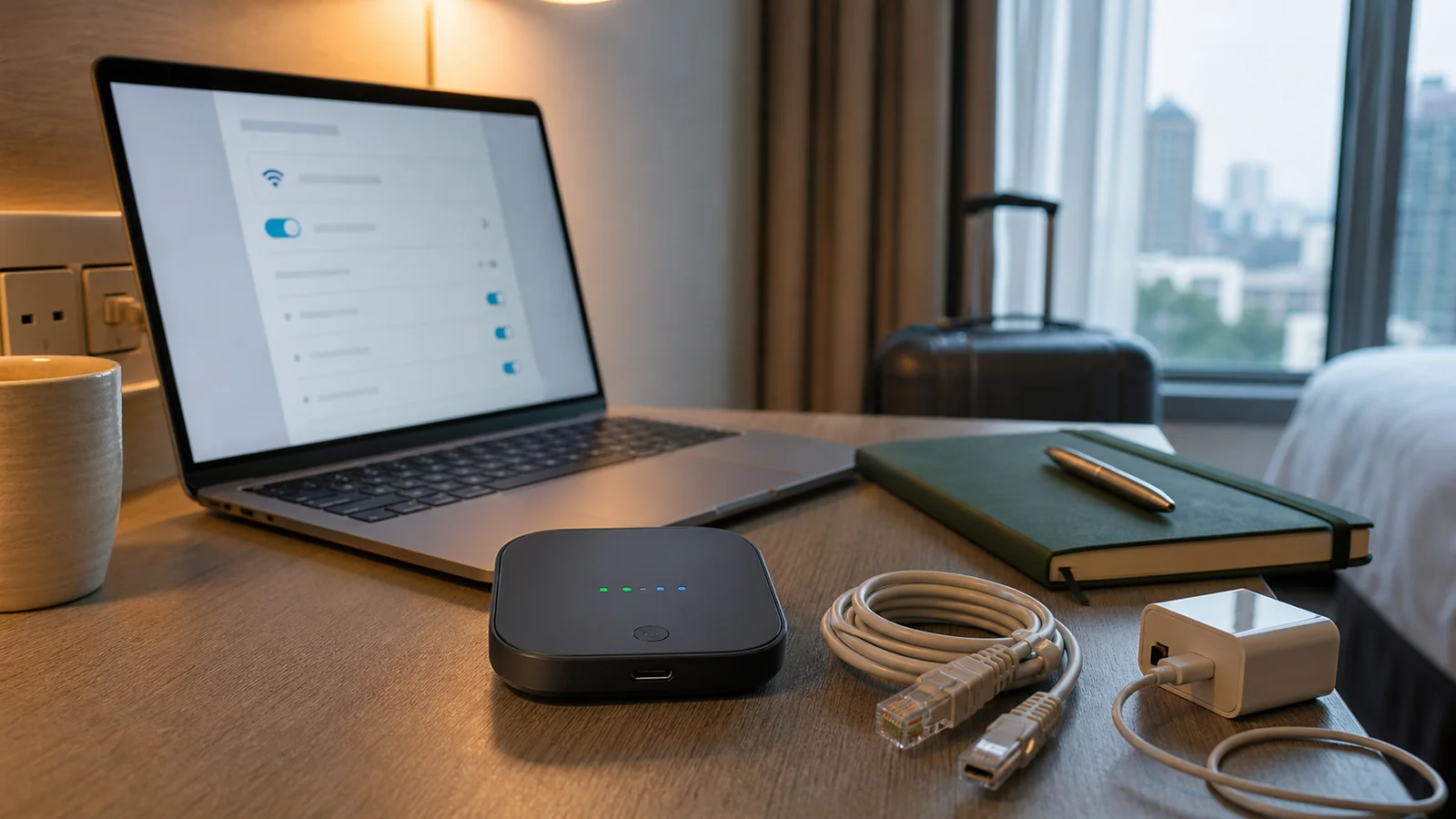
A Travel Router Solves a Very Specific Travel Problem
A travel router is a small device that creates your own private Wi-Fi network while using another internet source, such as hotel Wi-Fi, an Ethernet jack, a phone tether, or sometimes a mobile hotspot. It can make travel smoother when you carry several devices, work remotely, stay in hotels with awkward login pages, or want a consistent network name for your laptop, phone, tablet, and streaming stick.
It is not magic. A travel router cannot make bad hotel internet fast, bypass every captive portal cleanly, replace sensible security habits, or fix a weak connection from a concrete-walled room. But for the right traveler, it can turn a messy arrival into a calmer setup.
For slow city travel, we care about friction. If your trip includes a week in an apartment, a few hotel changes, remote work mornings, or a family of devices that all need the same connection, a travel router may earn its tiny space in the bag.
What a Travel Router Actually Does
Think of a travel router as a bridge. It connects to the available internet, then shares that connection through a network you control.
Depending on the model, it may support:
- Hotel or public Wi-Fi repeating
- Ethernet-to-Wi-Fi sharing
- USB phone tethering
- VPN client setup
- One login for multiple devices
- A familiar network name across stays
- Local file sharing or storage features
- USB power
- Ad blocking or DNS controls on some devices
The exact features vary widely. A small budget model may handle basic hotel Wi-Fi sharing. A more advanced model may support stronger VPN use, better antennas, faster Wi-Fi standards, and more configuration options.
Do not buy by the phrase “travel router” alone. Buy by the connection problem you need to solve.
Who Should Consider One
A travel router is most useful for people who notice Wi-Fi friction often.
| Traveler type | Why it may help | Watch out for |
|---|---|---|
| Remote workers | Stable device setup and VPN routing | Hotel internet may still be slow |
| Long-stay travelers | One familiar network across apartments | Initial setup takes patience |
| Families | Connect multiple devices through one login | Some hotels limit or block sharing |
| Streaming-device users | Easier setup for TV sticks or consoles | Captive portals can be awkward |
| Privacy-focused travelers | Route traffic through a trusted VPN | VPN speed and setup vary |
| Gear-light city travelers | Probably not essential | Phone hotspot may be enough |
If you travel with only a phone and a laptop, and you rarely work on the road, a travel router may be extra clutter. If you carry a laptop, tablet, e-reader, work phone, personal phone, and streaming device, it starts to make more sense.
Common Hotel Wi-Fi Problems It Can Help With
Hotel and rental Wi-Fi can be inconvenient in small ways that add up.
A travel router may help when:
- The hotel allows only a limited number of devices.
- Every device has to accept a captive portal separately.
- A streaming stick cannot handle the login page easily.
- Your devices keep forgetting each new network.
- You want your laptop and phone on a small private local network.
- The room has Ethernet but weak Wi-Fi.
- You want VPN routing for more than one device.
Many travel routers include a way to connect to a hotel Wi-Fi network, open the login page, accept the terms, then share the connection through your own network. Some models also offer captive-portal workarounds or app-based setup. Those features are helpful, but they are not guaranteed everywhere.
If the hotel network blocks sharing, requires device-specific authentication, or has unstable bandwidth, the router cannot fully solve it.
What It Does Not Fix
This is the part many product pages understate.
A travel router does not automatically fix:
- Slow hotel internet
- Weak signal in your room
- A blocked VPN
- A broken captive portal
- Bad video-call bandwidth
- Country-level internet restrictions
- Unsafe browsing habits
- Malware on a device
- A hotel network that bans routers
- Poor placement behind thick walls
It also does not make public Wi-Fi private in the way some people imagine. Your router can create a local network for your devices, but the upstream connection is still the hotel’s or cafe’s network. Use secure websites, trusted VPN settings when needed, software updates, and careful account habits.
The U.S. Federal Trade Commission’s public Wi-Fi guidance emphasizes using secure websites and taking care with sensitive activity on public networks. A travel router can be part of a cautious setup, but it is not a substitute for that baseline.
Features That Matter
Focus on practical features, not the longest spec sheet.
Easy Captive Portal Handling
Hotels, airports, and cafes often use a login or terms page before internet access works. A travel router should make that process clear. Some devices let you connect the router to the public Wi-Fi, open a setup page on your phone or laptop, complete the portal once, and then share access.
If reviews repeatedly complain about hotel login problems, take that seriously.
Ethernet Support
Some hotels, rentals, conference rooms, and older business hotels still have Ethernet ports. A travel router with Ethernet can turn a wired connection into your own Wi-Fi network. This can be more stable than repeating a weak wireless signal.
Bring a short Ethernet cable if you expect to use this feature.
VPN Client Support
Some travel routers can run a VPN connection for all devices connected to your private network. This is useful when you want one setup for multiple devices, but it can reduce speed. It also requires a VPN service and configuration that the router supports.
Check whether the router supports the VPN protocol you use. Do not assume all VPN apps translate cleanly to router setup.
USB Tethering or Mobile Backup
USB tethering can let the router share a phone’s data connection with several devices. This can help when hotel Wi-Fi fails, but it depends on your phone plan, tethering allowance, signal strength, and country roaming costs.
For international trips, roaming data can get expensive fast. Know the plan before using your phone as the upstream connection.
Power and Size
Most travel routers are small, but power needs differ. Some can run from USB power. Others need a wall adapter. For a compact city trip, cable mess matters.
Check:
- USB-C or micro-USB power
- Included adapter
- Power draw
- Whether a battery pack can power it
- Heat during use
- Size with cables included
The router itself may be tiny. The real packing footprint includes cable, adapter, Ethernet cable, and maybe a plug adapter.
Travel Router vs Phone Hotspot
For many travelers, a phone hotspot is simpler. It is already in your pocket and needs no extra setup. The tradeoff is battery drain, data limits, and sometimes weaker multi-device use.
| Option | Better for | Tradeoff |
|---|---|---|
| Travel router | Hotel Wi-Fi sharing, Ethernet, multiple devices, VPN routing | Extra device and setup |
| Phone hotspot | Quick backup, simple laptop use, no hotel login | Data limits, battery drain, roaming cost |
| Hotel Wi-Fi direct | Light travel, one or two devices | Repeated logins, device limits |
| Mobile hotspot device | Road trips and data-focused travel | Separate plan and hardware |
| Local SIM or eSIM | International data flexibility | Phone compatibility and plan rules |
If you are taking a short city break with light browsing, a phone hotspot backup may be enough. If you will work from three hotels over two weeks, the router becomes more attractive.
Setup Tips Before You Leave
Do not open the box in a hotel room at midnight. Set up the router at home first.
Before the trip:
- Update the router firmware.
- Change the admin password.
- Create a clear private network name.
- Set a strong Wi-Fi password.
- Test connecting your laptop and phone.
- Configure VPN if you will use it.
- Test Ethernet mode if available.
- Pack the needed cables.
- Save the router setup page or app login offline.
- Write down a reset plan in case settings break.
This is a small piece of tech, but setup stress feels bigger when you are tired, jet-lagged, or about to take a call.
How to Use One in a Hotel
The exact steps vary by model, but the pattern is usually similar.
- Plug in the router where the signal is strongest.
- Connect your phone or laptop to the router’s private network.
- Open the router’s setup page or app.
- Choose the hotel Wi-Fi or plug into Ethernet.
- Complete the hotel login or terms page.
- Confirm internet works through the router.
- Connect your other devices to your private network.
- Turn on VPN only after the basic connection works.
If something fails, simplify. Turn off VPN, connect one device, move the router closer to the door or window, or test hotel Wi-Fi directly. You want to know whether the problem is the hotel network, the router settings, or the device.
Security Habits Still Matter
A travel router can reduce some local-network mess, but you still need basic security habits.
Use:
- Strong router admin password
- Strong private Wi-Fi password
- Firmware updates
- HTTPS websites
- Multi-factor authentication
- A trusted VPN when appropriate
- Device updates before travel
- Care with banking and sensitive accounts on public networks
Avoid:
- Leaving the default admin password
- Using an open private network
- Assuming VPN means invincible
- Installing unknown router firmware from random links
- Sharing the private password with strangers
- Doing sensitive work on a network you do not understand
For remote work, also check your employer’s security rules. Some companies have specific VPN, device, and public-network policies.
What to Look For When Buying
Because real product lines change, use feature criteria instead of chasing a single model name.
Look for:
- Clear hotel Wi-Fi or captive portal support
- Ethernet port
- USB-C power if you prefer simpler cables
- VPN client support, if needed
- Enough Wi-Fi speed for your use
- Good setup app or web interface
- Regular firmware updates
- Helpful documentation
- Portable size
- Reviews from hotel and travel users
You do not need the fastest router if the hotel connection is the bottleneck. You do need a router you can understand at the end of a travel day.
When to Skip a Travel Router
Skip it when the setup cost is bigger than the problem.
You probably do not need one if:
- You only travel with a phone.
- You rarely work on trips.
- You stay mostly in places with strong private Wi-Fi.
- You already have generous phone data.
- You hate configuring small devices.
- You are packing extremely light.
- Your employer forbids personal networking gear.
In those cases, put the money toward better lodging location, a stronger phone data plan, or a quieter place to work.
Our travel brochure planning guide makes the same broader point: the right tool is the one that reduces friction in the actual trip, not the one that looks clever in a packing list.
FAQ
Is a travel router worth it for hotel Wi-Fi?
It can be worth it if you carry multiple devices, work remotely, use VPN, or often deal with hotel login pages. For one phone and one laptop, it may be unnecessary.
Can a travel router make hotel Wi-Fi faster?
Usually no. It can improve convenience and sometimes placement, but it cannot create bandwidth the hotel does not provide. If the upstream connection is slow, your private network will still be slow.
Can I use a VPN on a travel router?
Some travel routers support VPN client setup, but compatibility depends on the router and VPN service. Test it at home before relying on it while traveling.
Will a travel router work with captive portals?
Many are designed to handle hotel or public Wi-Fi login pages, but captive portals vary. Some networks may still block or complicate router sharing.
Is a phone hotspot better than a travel router?
A phone hotspot is better for quick, simple backup internet. A travel router is better for sharing hotel Wi-Fi or Ethernet with several devices and keeping a consistent private network.
The Bottom Line
A travel router is worth packing when Wi-Fi friction is a repeated part of your trips. It can simplify hotel logins, connect multiple devices, share Ethernet, and route traffic through a VPN when configured well.
It is less useful for very light travelers or trips where phone data already solves the problem. Choose one only if it makes your real mornings calmer, your work easier, or your device setup less annoying.
You might also like

Dog Travel Crate at Walmart: Choose the Right One
Use Walmart listings carefully by checking crate size, material, trip type, airline rules, safety details, and return terms.
Golf Travel Bags: How to Choose One for Flights
Pick a golf travel bag by protection, wheels, airline limits, storage space, and how your clubs will move through a real trip.
Guava Lotus Travel Crib: A Practical Review
See where the Guava Lotus Travel Crib works well for family trips, and where its floor mattress and price may not fit.